
What Is CRM Marketing Automation?
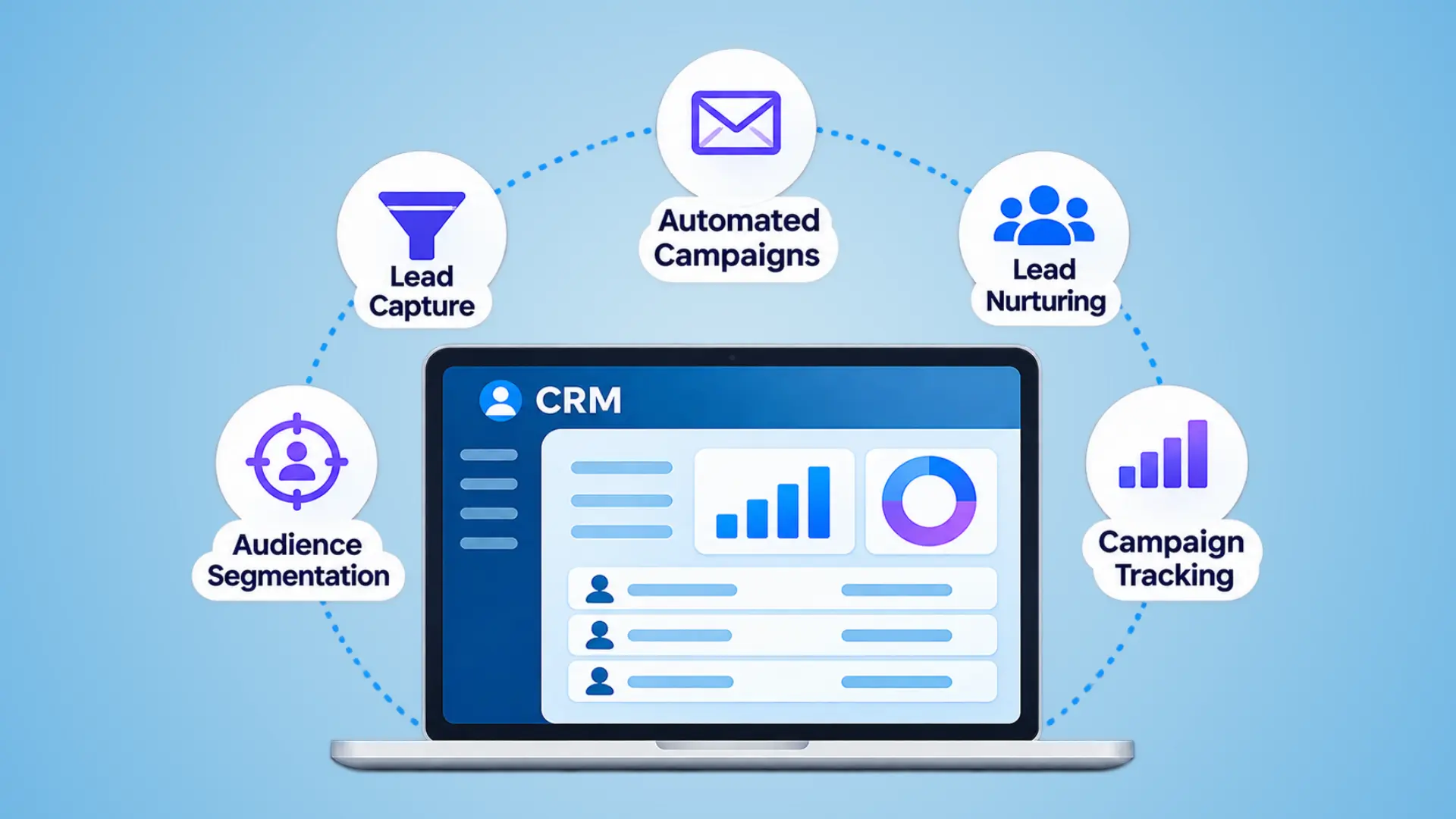
CRM marketing automation connects customer relationship management (CRM) with automated marketing activities. It allows businesses to use customer information and interaction history to trigger personalized campaigns, nurture leads, and coordinate follow-ups.
Although the two serve different purposes, they complement each other:
- CRM: Manages customer information, interactions, relationships, and sales activities.
- Marketing automation: Manages campaigns, audience segmentation, lead nurturing, and automated communications.
When connected, they give marketing and sales teams a shared view of customer activity. Marketing can deliver more relevant communications, while sales can understand a lead’s previous interactions before following up.
The capabilities available depend on whether marketing automation is built into the CRM or connected through a separate platform.
How CRM Marketing Automation Works
CRM marketing automation follows a continuous process that takes a lead from initial interest to sales follow-up and eventually connects campaign activity with business results.
1. Capture Leads
A potential customer submits a website form, responds to an advertisement, starts a chat, or registers for an event. The system creates or updates their contact record and captures information such as contact details, lead source, and inquiry type.
2. Score and Segment Leads
The system evaluates leads using predefined criteria. These may include customer attributes, such as job role or company size, and behavioral signals, such as visiting a pricing page or requesting a demo. Leads can then be grouped according to their interests, engagement, or readiness to buy.
3. Nurture Leads Automatically
Based on their behavior or segment, leads receive relevant follow-up communications through channels such as email, SMS, or WhatsApp, where supported and permitted. For example, someone who downloads a guide might receive related educational content before receiving a product or service offer.
4. Hand Qualified Leads to Sales
When a lead meets the agreed qualification criteria, the system can assign it to a sales representative, create a follow-up task, and send an alert. The representative can review the lead’s contact details and previous interactions before reaching out.
5. Track Campaign Performance
Campaign and lead activity can be connected to sales outcomes. Marketing teams can review which sources and campaigns generate qualified leads, opportunities, and revenue, then use those insights to improve future campaigns.
This creates a feedback loop between marketing and sales. The results of previous campaigns help teams refine audience segments, lead-scoring criteria, and follow-up workflows.
Key Features to Look for in a CRM for Marketing Automation
When evaluating a CRM for marketing automation, look beyond basic contact management and email scheduling. The platform should support the following capabilities:
1. Lead Capture and Segmentation
Look for website forms, landing pages, and advertising integrations that capture leads directly into the CRM. Segmentation capabilities should let you group contacts based on attributes such as industry, location, lead source, interests, and engagement history.
2. Lead Scoring
Lead scoring helps prioritize contacts based on their characteristics and interactions with your business. Check whether the platform lets you assign scores using custom criteria, such as job role, company size, website activity, and demo requests.
3. Visual Workflow Automation
A visual workflow builder makes it easier to create automated sequences using triggers, conditions, and actions. Look for branching logic, customizable delays, and exit conditions that stop a sequence when a contact replies, converts, or meets another defined condition.
4. Multichannel Communication
Depending on your audience and marketing strategy, you may need automated communication across email, SMS, and WhatsApp. Check which channels the platform supports, whether additional integrations are required, and how it handles message preferences, unsubscribe requests, and frequency limits.
5. Sales Handoff and Notifications
Marketing automation should make it easier to transfer qualified leads to sales. Look for automatic lead assignment, task creation, notifications, and access to the contact’s campaign and interaction history.
6. Campaign Reporting and Attribution
The platform should provide more than email open and click reports. Look for campaign performance tracking, lead conversion reports, and attribution capabilities that connect marketing activity with opportunities and revenue.
7. Integrations and API Support
Check whether the CRM connects with your website, advertising platforms, email tools, accounting software, and other business applications. Native integrations, APIs, and integration platforms can help synchronize information and reduce manual data transfers. If your records live in several tools, see how CRM and document management integration keeps them in sync.
8. AI-Powered Marketing Capabilities
AI can enhance CRM marketing automation by analyzing customer behavior, identifying high-intent leads, personalizing campaign content, and predicting suitable communication times. AI-powered chatbots can also respond to inquiries and help capture lead information.
When evaluating a platform, check whether it offers AI-assisted lead scoring, content recommendations, workflow suggestions, and campaign performance insights. These capabilities vary by platform and subscription.
Benefits of Using a CRM for Marketing Automation
CRM marketing automation helps businesses make their marketing processes more consistent, improve coordination between teams, and understand how campaigns contribute to sales. Some of its key benefits include:
1. Faster Lead Follow-Up
Automated workflows can respond to inquiries as soon as they are submitted. This reduces delays in initial communication and helps businesses engage potential customers while their interest is still high.
2. Better Lead Prioritization
Lead scoring and segmentation help marketing teams identify contacts who are more likely to become customers. Sales representatives can then prioritize follow-ups based on a lead’s interests, engagement, and readiness to buy.
3. Improved Marketing and Sales Alignment
When both teams work with connected customer records, sales representatives can see previous marketing interactions, while marketers can understand how leads progress through the sales pipeline. This reduces information gaps and makes handoffs more consistent.
4. Reduced Manual Work
Routine activities such as sending follow-up emails, updating contact records, assigning tasks, and managing campaign sequences can run automatically. This gives teams more time to focus on campaign planning, customer conversations, and other higher-value work.
5. Better Visibility into Marketing Performance
Connecting campaign activity with CRM and sales data helps businesses understand which channels generate qualified leads and contribute to revenue. Teams can use these insights to adjust campaigns and allocate marketing resources more effectively.
Native CRM Automation vs. an Integrated Marketing Automation Stack
Businesses can implement marketing automation in three ways: use automation features built into their CRM, connect a dedicated marketing automation platform, or build custom integrations between existing systems.
The right approach depends on the complexity of your campaigns, existing technology, budget, and available technical resources.
| Approach | Best Suited For | What to Consider |
|---|---|---|
| Native CRM Automation | Small and mid-sized teams with straightforward marketing workflows | Easier to manage within one platform, but advanced campaign capabilities may be limited |
| Integrated Marketing Automation Stack | Businesses running complex, multichannel campaigns | Offers more specialized capabilities and requires integration and synchronization |
| Custom Integration | Businesses with existing systems that need to work together | Provides flexibility but requires development, testing, and technical support |
Which Approach Should You Choose?
Native CRM automation is a practical choice when your marketing requirements are relatively simple and you want customer records, sales activities, and campaigns managed within one platform.
An integrated marketing automation stack is more suitable when you need advanced campaign journeys, specialized marketing tools, or greater control over multichannel communication.
Custom integration makes sense when replacing existing systems is not practical and you need to connect specific tools or build workflows around your business processes.
Whichever approach you choose, establish a clear source of truth for customer information and consent records. Define how data moves between systems to avoid duplicate records, conflicting information, and inconsistent communication preferences.
How to Choose a CRM for Marketing Automation
1. Automation Capabilities
Check whether the platform supports the workflows your team needs. Look for conditional logic, branching sequences, lead scoring, automated follow-ups, and the ability to stop campaigns when a contact takes a specific action.
2. Data Management and Integrations
Evaluate how the platform captures, stores, and synchronizes customer information. Check for native integrations, API access, custom fields, and reliable data imports. Make sure it connects with the tools your business already uses.
3. Pricing and Scalability
Compare pricing based on users, contact volume, email sends, automation limits, and available features. Also consider onboarding fees, additional integrations, and costs associated with upgrading as your database and marketing requirements grow.
4. Compliance and Consent Management
Check whether the platform supports consent records, unsubscribe handling, suppression lists, communication preferences, and audit trails. These capabilities are important for managing marketing communications across different regions and channels.
5. Reporting and Attribution
Look beyond basic campaign metrics. Check whether the platform can track lead progression, campaign performance, opportunity creation, and revenue attribution. Reporting should help your team understand which marketing activities contribute to business results.
6. Implementation and Support
Evaluate the effort required to configure the platform, migrate existing data, build workflows, and train employees. Clarify what implementation support the vendor provides and identify who will manage the system internally.
How Popular CRM Platforms Handle Marketing Automation
| Platform | Automation Approach | Integration Considerations |
|---|---|---|
| HubSpot | Native CRM and Marketing Hub ecosystem | Workflows are available according to subscription level. Staying within HubSpot reduces the need for external CRM integration. |
| ActiveCampaign | Marketing automation with built-in CRM capabilities | Suitable for email journeys and sales pipeline automation. External CRM integration may be needed if you use another CRM. |
| Zoho CRM | Built-in marketing tools, with Zoho Marketing Automation for broader journeys | Offers integration between its CRM and marketing automation products. |
| Salesforce | Salesforce CRM with Account Engagement or Marketing Cloud | Connected products that require configuration, data synchronization and appropriate licensing. |
| SugarCRM | SugarCRM integrated with Sugar Market | Uses a dedicated marketing automation product with CRM connectors and data synchronization. |
How to Set Up CRM Marketing Automation in 6 Steps
1. Audit and Prepare Your CRM Data
Review existing contact records, remove duplicates, correct outdated information, and standardize important fields such as lead source, country, industry, and job title. Also, identify which system will serve as the primary source of customer information if you use multiple platforms.
2. Define Lead Lifecycle Stages
Work with your sales and marketing teams to establish clear definitions for each stage of the customer journey. Define the criteria for moving between stages and assign responsibility for each handoff.
3. Configure Lead Scoring
Create a scoring model based on customer fit and engagement. For example, you might assign points for a relevant job role, visiting a pricing page, or requesting a product demonstration.
Start with a small set of meaningful criteria. Review the scores against actual sales outcomes and adjust the model as you gather more data.
4. Build Your Initial Automation Workflows
Start with three workflows that address common marketing needs:
- New-lead follow-up: Send an acknowledgment and relevant information after someone submits an inquiry.
- Lead re-engagement: Reach out to eligible contacts who have stopped interacting with your business.
- Post-demo follow-up: Share relevant resources and coordinate the next steps after a demonstration or consultation.
Define the trigger, audience, message sequence, and exit conditions for each workflow before activating it.
5. Configure Consent and Communication Preferences
Record how and when contacts provide permission for marketing communications where required. Configure unsubscribe handling, suppression lists, and channel-specific communication preferences. Make sure these settings apply across connected platforms and automated workflows.
6. Measure and Optimize Performance
Monitor metrics that connect marketing activity with business outcomes, including:
- Time taken to follow up with new leads.
- Lead-to-opportunity conversion rate.
- Marketing-sourced pipeline.
- Revenue influenced by marketing campaigns.
- Workflow engagement and conversion rates.
Review performance regularly to identify ineffective workflows, improve targeting, and refine your automation rules.
Start with a few well-defined workflows and expand gradually as your team understands what works. A smaller, well-maintained automation setup is more useful than a large collection of workflows that nobody regularly reviews.
Common Mistakes When Automating Marketing in a CRM
- Automating before cleaning data: Duplicate or outdated records can lead to incorrect segmentation and irrelevant messages.
- Building too many workflows at once: Launching multiple sequences simultaneously makes testing, troubleshooting, and maintenance difficult.
- Ignoring consent requirements: Missing consent records and inconsistent unsubscribe handling can create compliance risks.
- Focusing only on engagement metrics: Opens and clicks don’t necessarily translate into qualified leads, opportunities, or revenue.
- Neglecting workflow maintenance: Outdated messages, offers, and triggers can make automated campaigns ineffective over time.
Regularly review your workflows, data, and campaign results to keep your automation relevant and effective.
Case Study: AI-Enhanced SMS Automation for Appointment Generation
A US-based legal services firm faced challenges responding to inquiries outside business hours and managing appointment scheduling manually.
Nablasol developed an AI-enhanced Auto SMS solution integrated with communication platforms and CRM systems to:
- Automatically respond to incoming inquiries.
- Help customers schedule or reschedule appointments.
- Manage communication preferences through opt-in and opt-out controls.
The solution reduced manual scheduling efforts, improved response times, and made appointment booking more convenient.
Read the full AI-enhanced Auto SMS case study.
Making CRM Marketing Automation Work for Your Business
CRM marketing automation is most effective when the right technology is supported by accurate customer data, well-defined workflows, and coordination between marketing and sales.
Whether you choose built-in CRM automation or an integrated platform, start with your business requirements, automate a few essential processes, and improve them based on measurable results.
The goal isn’t to automate every interaction. It’s to make customer communication more timely, consistent, and relevant.
FAQ: CRM for marketing automation
What is CRM in marketing automation?
CRM in marketing automation means using a customer relationship management system as the database that drives automated campaigns. Contact data, lead scores and deal stages live in the CRM, and workflows use them to send emails, SMS or WhatsApp messages and to alert sales. The result is one record per contact that marketing and sales both update and trust.
What is the best CRM for marketing automation?
There is no single best option; it depends on team size, budget, integrations and compliance needs. HubSpot, Salesforce, Zoho CRM, ActiveCampaign and SugarCRM are common shortlist picks. Score each against six criteria (automation depth, integrations, pricing, compliance tools, reporting, implementation) and pilot one real workflow before committing to a contract.
Can small businesses use CRM marketing automation?
Yes. Small teams usually do best with a CRM that has automation built in, which avoids paying for and syncing two systems. Start with three workflows: new-lead follow-up, re-engagement of stale leads and a post-demo sequence. Expand only after your contact data is clean and you can measure which workflow produces pipeline.